What Does the Fishin' Frenzy App Actually Show You?
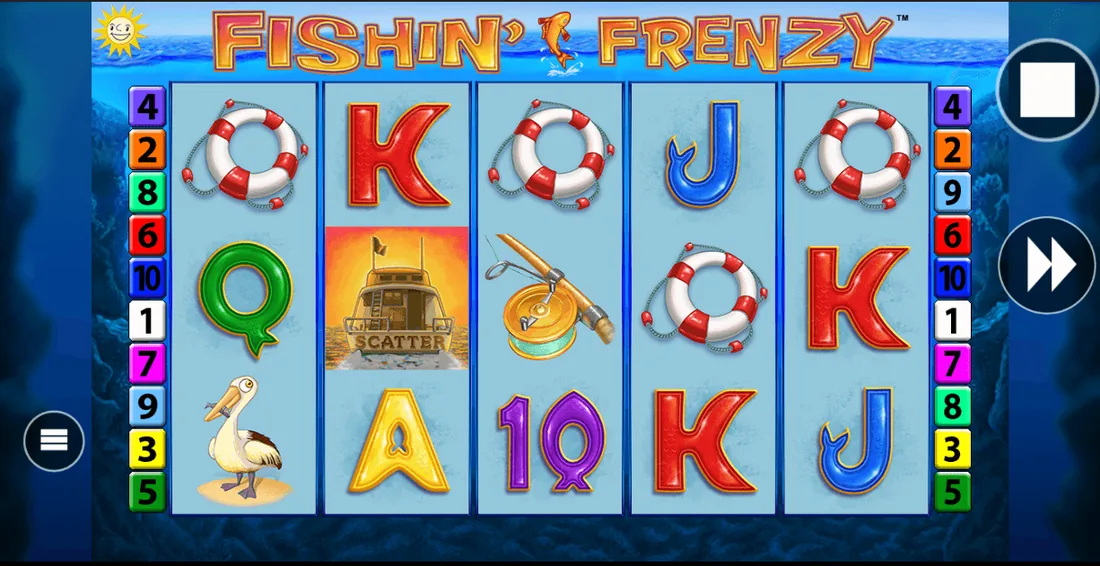
People google «Fishin' Frenzy app download» and expect an APK file or an App Store button. Here's the reality: Fishin' Frenzy from Blueprint Gaming runs inside your browser—no native app exists. What you're actually installing is a shortcut to a casino's mobile site, and the game streams from Blueprint's servers. The confusion comes from older slot machines that did ship standalone apps, but UKGC-licensed operators moved everything to HTML5 years ago to keep content updates instant and avoid app-store approval delays.
This page walks through what you'll see on your screen before you tap anything: the store-style card that isn't in any store, the four installation paths and which one carries risk, the interface breakdown so you know what each button does, and the red flags that separate legitimate operators from fake clones trying to lift your payment details. If you're deciding whether to add this to your home screen or stay in Safari, you'll know the trade-offs by the end.
The Store Card That Only Exists on Casino Sites
UKGC operators present Fishin' Frenzy as if it were a standalone product, complete with a mock app-store card. This isn't deception—it's a UX pattern borrowed from real stores to help mobile players decide whether the game suits their phone. Here's what a typical card shows, with numbers that reflect the slot's footprint across licensed sites:
The «downloads» figure counts unique sessions, not installations—there's nothing to install. The version number refers to Blueprint's backend build; you'll never see an update prompt because the game reloads the latest code every time you launch it. The rating aggregates player feedback from operator reviews and third-party slot databases, not a centralised app store.
Four Ways to «Install» It—and the One That Breaks Rules
Installation means different things depending on your route. Three paths are safe and UKGC-compliant; the fourth—sideloading an APK—puts you outside regulated protections. Here's what happens with each:
- Browser bookmark: Open the casino site in Safari (iOS) or Chrome (Android), navigate to Fishin' Frenzy in the lobby, tap the share icon, choose «Add to Home Screen». Risk: none. You're creating a shortcut; the game still runs in the browser, and the operator's UKGC licence covers you. The icon appears on your home screen, but tapping it just opens the casino's URL with the game pre-selected.
- Progressive Web App (PWA): Some operators serve a PWA version—visit the mobile site, and a banner prompts you to install. Accept, and the site behaves like a native app: full-screen, offline lobby (though the game itself needs a connection), and push notifications for bonuses. Risk: minimal, provided the domain matches the operator's UKGC-registered URL. Check the licence number in the footer before you install—fake sites mimic the PWA prompt to harvest logins.
- Operator's native app: A handful of UK casinos publish apps on Google Play and the App Store (Apple restricts real-money gambling apps to licensed jurisdictions, and the UK qualifies). Download the operator's app, log in, find Fishin' Frenzy in the slots section. Risk: none if you're downloading from the official store listing. The app is a wrapper around the same HTML5 game; Blueprint doesn't build separate native code.
- APK sideload: Third-party sites offer «Fishin' Frenzy APK» files for Android. Risk: high. These aren't official Blueprint releases—they're either repackaged casino apps from unlicensed operators or outright malware. Sideloading bypasses Google Play's vetting, and you lose UKGC protections: no GAMSTOP integration, no deposit limits, no KYC. If the APK asks for SMS or contact permissions, it's harvesting data. Legitimate slot games never need those.
The safe bet: stick to routes 1–3, and verify the operator's UKGC licence number in the public register before you hand over a debit card. If the site skips age verification or accepts credit cards (banned for UK gambling since April 2020), you're on an unlicensed platform.
What You See When the Game Loads
Fishin' Frenzy's mobile interface strips the desktop version down to five core screens, designed for thumb-tap navigation. Here's the walkthrough:
- Launch screen: A pier stretching over blue water, animated ripples, and a fisherman casting a line. The «Play» button sits centre-screen; tap it, and the reels appear. Below the button: your balance (in £0.00 format), the current stake (adjustable via a slider), and an «i» icon that opens the paytable. The UKGC logo appears in the footer, along with the operator's licence number—this confirms you're playing a regulated version.
- Reel view: Five vertical reels fill most of the screen, with symbols sized for mobile visibility—fish, rods, lifeboats, and pelicans. The spin button is a large orange circle at the bottom right, easy to hit with one hand. Top-left: a hamburger menu for autoplay, sound, and quick deposit. Top-right: your current balance and the spin cost. The stake slider appears when you tap the coin icon; it snaps to preset increments (£0.10, £0.20, £0.50, £1.00, £2.00, £5.00). If you're aged 18–24 and select £5.00, the slider locks at £2.00 with a red banner explaining the age cap.
- Free Spins screen: Trigger three fisherman scatters, and the interface shifts to a bonus-round layout. The reels stay in place, but a counter appears top-centre showing spins remaining. A «Collect» button replaces the spin button during the prize-pick feature—tap fish symbols to reveal cash amounts or extra spins. The total win accumulates in a yellow box above the reels, updating in real time. Once the feature ends, a summary screen shows your total haul before returning to the base game.
- Paytable overlay: Tap the «i» icon, and a scrollable overlay lists symbol payouts, feature rules, RTP (96.12% is standard for Blueprint's version; some operators reduce it to 94.01%—the paytable must disclose which), and volatility (medium-high). The overlay also explains the Free Spins mechanic and confirms the maximum win (10,000× stake). Swipe down to close.
- Settings drawer: The hamburger menu reveals autoplay options (10/25/50/100 spins, with mandatory loss and single-win limits), sound toggles, game history (your last 50 spins with outcomes and stake), and quick links to responsible gambling tools. UKGC sites must surface deposit limits and self-exclusion here; if those links are missing, you're on an unlicensed clone.
Phone Requirements and What Drains Your Battery
Fishin' Frenzy runs on any device with a modern browser, but performance varies by hardware. Here's what you need and what to expect:
- Minimum specs: iOS 13+ (Safari 13+), Android 8.0+ (Chrome 90+), 2 GB RAM, and a stable 3G connection. Older phones struggle with the animated water effects—expect frame drops on devices from before 2018.
- Recommended: iOS 15+ or Android 11+, 4 GB RAM, 4G or Wi-Fi. The game streams assets on demand rather than caching everything, so a weak signal causes stuttering spins or delayed payouts.
- Battery drain: Blueprint's engine is efficient, but continuous play still pulls 15–20% per hour on most phones. The animated backgrounds and WebGL effects (used for the Free Spins water splash) consume more power than static-reel slots. Close other apps and drop screen brightness to stretch your session.
- Data usage: Approximately 8–12 MB per hour for gameplay, excluding deposits or withdrawals (those add a few kilobytes for payment-provider handshakes). Demo mode uses the same bandwidth as real-money play—the game client doesn't distinguish between the two.
If the game freezes mid-spin, refresh the page. HTML5 slots save your bet and round outcome server-side, so you won't lose the spin—reloading triggers a recovery pop-up that restores your balance and completes the interrupted round. This is a UKGC requirement; unlicensed clones often skip it, leaving your stake in limbo.
Spotting Fake Clones and Dodgy Permissions
Unlicensed sites and rogue APKs mimic Fishin' Frenzy's branding to trick players into depositing outside UKGC oversight. Here's how to separate legitimate operators from traps:
- UKGC register check: Every legal operator displays a licence number (format: 000-000000-X-000000-XXX) in the footer. Copy it, paste it into the UK Gambling Commission's public register, and confirm the match. If the number is missing, fake, or belongs to a different company, you're on an unlicensed site. GAMSTOP integration is another giveaway—legitimate operators link to it in the settings; clones omit it because they're not in the system.
- Deposit methods: UKGC sites accept debit cards, PayPal, Apple Pay, and Open Banking (Trustly). They do not accept credit cards (banned since 2020) or cryptocurrency. If the payment page offers Bitcoin or credit-card options, you're dealing with an offshore operator. Withdrawals via Faster Payments (same-day to two working days) are standard; anything promising instant cashouts without KYC is a red flag.
- APK permissions: A legitimate Fishin' Frenzy game (if one existed as a native app) would request storage access (to cache assets) and network access (to stream the game). It would never ask for SMS, contacts, phone calls, or camera. If an APK requests those, it's malware harvesting your data. Google Play Protect flags most of these, but sideloaded APKs bypass the scan.
- RTP disclosure: UKGC rules require operators to show RTP before you play. Tap the «i» icon and scroll to the paytable—if the RTP isn't listed, or if it's absurdly high (99%+), the game is either tampered with or a scam. Blueprint's official version sits at 96.12% or 94.01% depending on operator configuration; anything outside that range is suspect.
- Stake caps by age: Try setting a £5.00 stake. If the game lets you spin at that level without asking your age, the operator isn't enforcing UKGC rules—players aged 18–24 must be capped at £2.00. Legitimate sites verify your birthdate during registration and lock the slider accordingly.
One last tell: unlicensed clones often skip the «What's New» section in their mock app cards because they're not receiving Blueprint's updates. Legitimate operators reflect version changes (bug fixes, new bonus features, RTP tweaks) within days of release. If the card says «last updated six months ago» and the game still has a known graphical glitch, you're on a pirated version.
FAQ
Can I download Fishin' Frenzy directly from the App Store or Google Play?
Blueprint Gaming doesn't publish a standalone Fishin' Frenzy app—the game runs in your browser via UKGC-licensed casino sites. Some operators have native apps on Google Play and the App Store, and Fishin' Frenzy sits inside those as an HTML5 game. You'll never find a solo «Fishin' Frenzy» listing; it's always bundled with an operator's full casino library.
Why do APK sites offer a Fishin' Frenzy download if there's no official app?
Those APKs are repackaged casino wrappers from unlicensed operators or malware disguised as the game. Blueprint doesn't distribute APK files, and sideloading one bypasses UKGC protections: no GAMSTOP, no deposit limits, no KYC. If the APK asks for SMS or contact permissions, it's harvesting your data—legitimate slots never need those.
Does the «Add to Home Screen» shortcut work the same as a native app?
Functionally, yes—it opens the game in a full-screen browser window without the Safari or Chrome UI, so it feels like a native app. Performance-wise, it's slightly slower to launch because the browser has to reload the page. The upside: you're not storing anything locally, and you're always playing the latest version without manual updates.
How much mobile data does Fishin' Frenzy use per session?
Expect 8–12 MB per hour for gameplay. The game streams assets on demand rather than caching the full library, so a weak signal causes stuttering or delayed spins. Demo mode and real-money play use identical bandwidth—the client doesn't distinguish between the two.
What happens if the game crashes mid-spin on my phone?
HTML5 slots save your bet and round outcome server-side. Refresh the page, and a recovery pop-up completes the interrupted spin and restores your balance. This is a UKGC requirement; unlicensed clones often skip it, leaving your stake in limbo. If the recovery prompt doesn't appear, check the operator's licence number—it might not be legitimate.
Why is my stake capped at £2.00 when other players can bet £5.00?
The UKGC introduced age-based stake limits: players aged 18–24 are capped at £2.00 per spin, while those 25 and over can bet up to £5.00. The operator enforces this automatically after age verification during registration. If a site lets you bypass the cap without asking your birthdate, it's not UKGC-licensed.